
Do you know how many SIM cards are registered on your CNIC right now? Most people don’t. Old SIMs from a past job, a free package line, or a SIM issued without your knowledge can all sit on your identity card for years.
This matters because the CNIC holder is the one responsible for any SIM registered under their name. If an unknown number is used for fraud or spam, the trail leads back to you.
This guide shows you how to check your SIM owner details using official PTA tools, what to do if you find a SIM you don’t recognize, and which fake websites to avoid.
Why You Should Check the SIMs on Your CNIC
A quick check every few months protects you in several ways:
- Catch identity misuse early. Someone may have used a copy of your CNIC to get a SIM.
- Protect your mobile wallet. JazzCash, Easypaisa, and bank apps send OTPs by SMS, so a SIM you don’t control is a real risk.
- Avoid legal trouble. Activity from a SIM in your name can become your problem.
- Clean up old lines. You can close SIMs you no longer use and free up space under your limit.
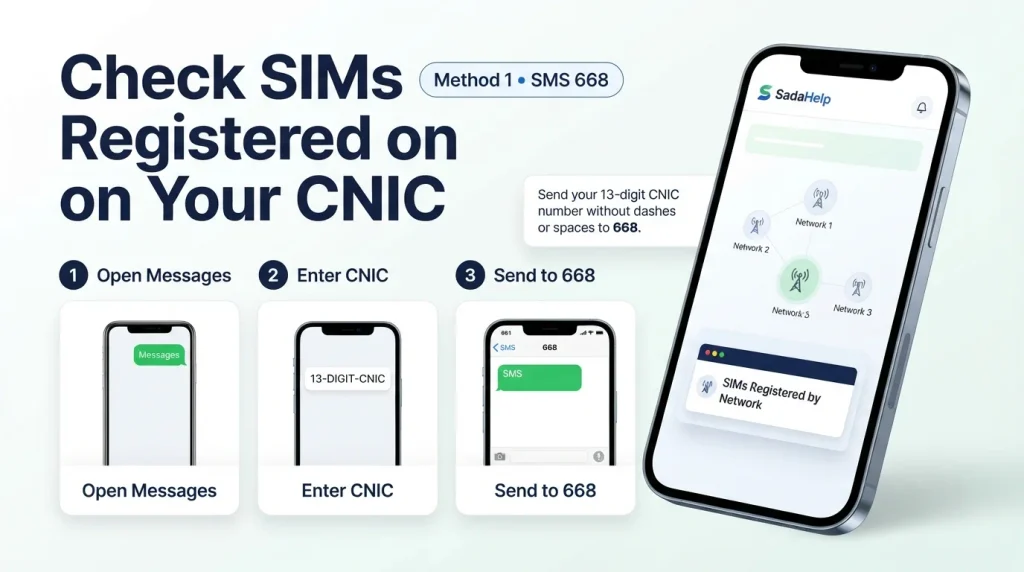
Method 1: Check SIMs Through SMS (668)
This is the fastest method and works from any basic phone.
- Open the Messages app.
- Type your 13-digit CNIC number with no dashes or spaces.
- Send it to 668.
- You’ll get a reply showing how many SIMs are registered on your CNIC, listed by network.
Note: Each SMS to 668 may cost a small fee, which has been around PKR 2 plus tax. Check the current charge with your operator.
Method 2: Check SIMs on the PTA Website (cnic.sims.pk)
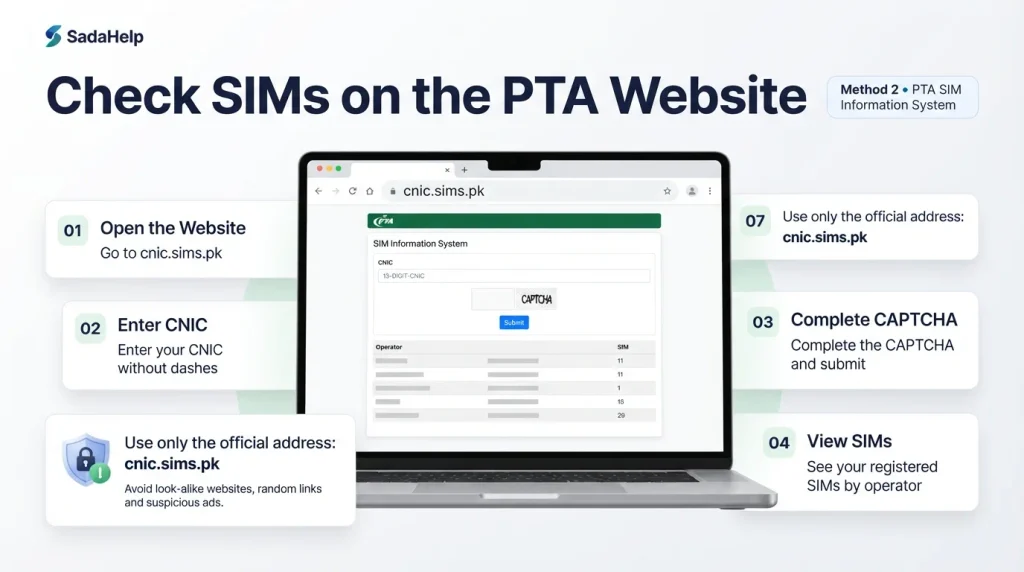
If you prefer a screen, use the PTA SIM Information System.
- Open your browser and go to cnic.sims.pk.
- Enter your CNIC number without dashes.
- Complete the captcha and submit.
- A table will show your registered SIMs organized by mobile operator.
Only type your CNIC on this exact address. Look-alike websites are common, so avoid opening it from links in random messages or ads.
How Many SIMs Can You Have on One CNIC?
The widely quoted limit is five SIMs per CNIC across all networks. If you’ve reached the limit and want a new SIM, you’ll need to block one you don’t use. PTA has changed rules and short codes more than once, so confirm the latest limit on PTA’s official website before you act on any number.
What to Do If You Find a SIM You Don’t Recognize
Don’t ignore it. Act quickly:
- Note the details. Write down the network and the number if you can see it.
- Visit the operator’s customer center. Go to the franchise of the network that issued the SIM (Jazz, Zong, Telenor, Ufone, or SCOM).
- Bring your original CNIC. Carry a clean photocopy too.
- Ask to block the SIM. Explain that the number isn’t yours and request that it be blocked or disowned.
- Verify with your fingerprint. The staff will confirm your identity on the biometric device.
- Check again after a few days. Send your CNIC to 668 once more to confirm the SIM is gone.
If you suspect fraud, report it as well. You can contact the FIA Cybercrime Wing or your operator’s helpline.
Beware of Fake “SIM Database” Websites
Search for SIM information online and you’ll find many sites and apps promising the owner’s name, home address, or even live location for any number. Stay away from them:
- They aren’t official. PTA’s tools only let you check SIMs on your own CNIC.
- They’re often scams. Many show fake results or collect your data, and some spread malware.
- They can be illegal. Trying to get another person’s private information without permission may break Pakistan’s cybercrime law (PECA).
Use only the official methods in this guide, and never share your CNIC photo or OTP codes with anyone.
Frequently Asked Questions
Can I check who owns any phone number?
No. The official PTA tools show information for your own CNIC only. Sites that claim otherwise are unreliable and may be unlawful.
Is checking my SIMs free?
The cnic.sims.pk website is free to use. SMS to 668 may carry a small charge.
How often should I check?
Every three to six months is a good habit, and right away if you lose your CNIC or notice strange calls or messages.
What if the result shows more SIMs than I own?
Visit the operator’s customer center with your original CNIC and request that the unknown SIMs be blocked.
Will blocking a SIM free up my limit?
Yes. Blocked SIMs stop counting toward the limit, so you can register a new one.
Final Words
Checking your SIM owner details takes about a minute and can save you from identity misuse and fraud. Send your CNIC to 668 or visit cnic.sims.pk today, and block any line you don’t recognize.